
Boost Your Imagination
Author studio · AI co-writer · Self-publishing

Everything you need to write and publish your book

Boost Your Imagination is a complete author studio: a distraction-free editor, your characters and world in one place, an AI assistant that writes with you and proofreads for you, illustrations and covers, and export to the formats Amazon KDP and Litres ask for.

Free plan, no card required · Windows & Linux desktop apps · English, Русский, Türkçe

Writing a book is not one job — it is nine

Most writing tools solve one of them and leave you to glue the rest together by hand. That gluing is where books die.

Hiring the specialists

  • A co-author and a developmental editor
  • A world-building assistant who remembers everything
  • A copy editor and a proofreader
  • A beta reader who tells you what actually lands
  • An illustrator and a cover designer
  • A formatter who prepares EPUB, PDF and DOCX
  • Months of coordination — and a five-figure bill

One author studio

  • An AI co-writer that drafts only with your consent
  • Characters, relationships, world notes and timeline in one map
  • Grammar fixes with a before-and-after you approve
  • A quality score that separates a rough draft from a polished scene
  • Illustrated panels and AI book covers
  • One-click export to EPUB, PDF and DOCX
  • One writer, one window, from blank page to finished edition

Built for the whole book, not just the sentence

Every feature below appears on screen in the videos — nothing here is a roadmap promise.

Distraction-free editor

Chapters and scenes in one tree, focus mode, read-aloud, find and replace, a daily word goal, and a right-click toolkit so you never leave the page to note something down.

AI writing assistant

Four modes in one menu — chatbot, ghostwriter, editor and graphic studio. You choose what it may read, the credit cost is printed on the button, and nothing enters your book until you press Apply.

Characters & world building

Deep character profiles with roles and importance, a relationship map, world notes, a timeline, plot threads and a glossary — the story bible that keeps a long novel consistent.

Story trackers

World pressure, a grief log, symbols and your own custom trackers, plus an emotional arc chart, so a thread never quietly goes missing.

Illustrations & book covers

Six drawing styles, a panel wizard that tells you the cost before it spends anything, and a cover studio for the front and back of the book.

Publish-ready export

Live book preview at real trim sizes, front matter, table of contents, and export to EPUB, PDF and DOCX — the formats self-publishing platforms want.

See the whole studio in action

Eight walkthroughs, about half an hour in total, recorded on a real manuscript. Every screen is the product — nothing is mocked up.

How to Write a Book: Full Tour of the AI Writing Studio

A complete walkthrough of Boost Your Imagination — the writing workspace, chapters and scenes, cast, relationship map, world notes, timeline, AI assistant, book preview and export. You have a story; this shows you how to turn it into a published book.

Read the transcript

You have a story — and BYI shows you how to turn it into a published book. BYI is a studio where you write and publish your book. For beginners and pros, for any genre. You don't need to be a writer — it guides you step by step. On first launch a short tour shows you where everything is — you'll find your way in a minute. Everything in

one window: tools on the left, your books in the middle, the scene you're writing on the right. And it's not just a hobby: self-publishing is booming, and the platforms really pay authors. BYI takes you to a finished book by the hand. First — the editor. Write scene by scene; it counts your words and keeps your drafts. Just sit down and write. Second — your characters. Roles, personalities

and motives always at hand, so no one slips out of character. Relationships show on a map: allies, enemies, secret ties. You always know who's who. The book's world, sorted onto shelves: locations, facts, lore — no need to hold it all in your head. Events line up into a timeline, so the plot never falls apart. Third — the AI assistant. It sees your whole project: answers questions, helps

with characters and world, suggests where to go next. An assistant, not the author — the book stays yours. Fourth — the finished book. A live preview shows exactly how it will look to a reader. You don't need to be a professional. AI doesn't write the book for you — it helps; and with that help authors are already winning top awards. The rest is your story. The hardest

part isn't starting — it's finishing. For every common obstacle, BYI has a ready answer. Your own terms live in a glossary, with definitions and tags: one meaning across the whole book. Trackers follow tension, losses and symbols, chapter by chapter. Plot threads are visible end to end: what's open, and what's already resolved. Search runs across every scene's text — the right spot is found in seconds. When the

book is ready — export to EPUB, PDF and DOCX. Exactly the formats Litres and Amazon KDP ask for. Ten looks — pick the one you enjoy writing in. There's a dark theme too — for long nights with your book. Shortcuts speed everything up: Ctrl+K and you're already where you need to be. The interface is in English, Russian or Turkish. Work in your own language. One project —

a whole series: several books, or one novel in different language versions. And each project's data stays isolated. Your story deserves to become a book. Start now — byi.skynet.com.
Book Writing Software That Keeps You in the Flow

The hardest part isn't starting — it's not falling out of the flow. Right-click Writer Toolkit, quick-add windows, scene notes, highlights, POV checklist, focus mode, find and replace, read-aloud and a daily word goal — all without leaving the page.

Read the transcript

The hardest part isn't starting — it's not falling out of the flow. BYI keeps everything you need on one page. Ordinary editors throw you off the page every time you need to note something — and the thought is lost. BYI is different. Here's your scene. A clean page and a comfortable editor — just sit down and write. Need a new character, a relationship, a world note or

an event? Right-click right in the text — and add it without leaving the page. A small window, only the fields you need. Save — and keep writing. The thought isn't lost. Select a line — a colored highlight or a sticky note right in the text, like notes in a manuscript's margin. Scene notes stay close: questions to yourself, ideas, edits for later. A POV checklist helps you deepen

the scene: bodily sensations, hidden feelings, the character's inner contradictions. One key — and everything else falls away. Just you and the text. Ctrl+F — find and replace across the whole scene in seconds. The app reads your text aloud at your pace and counts words toward your daily goal — progress at a glance. Characters, sticky notes, search, focus — all summoned from the page. Saves time, keeps focus,

nothing is lost. Stay in the flow — and finish your book. Start at byi.skynet.com.

Character and World Building Software for Authors

A big book lives in its details. Build the cast with roles and importance, deep character profiles, relationships and a relationship map, world notes, timeline, plot threads, trackers and a glossary — so nothing slips and no inconsistency reaches the finished book.

Read the transcript

A big book lives in its details. BYI keeps your whole world and every character in one place — nothing is lost. Who knew what, when it happened, how the characters connect — in a big book the details slip. BYI remembers for you. Every character — with a role and importance: leads, antagonists, supporting. The whole cast at a glance. Each one gets a deep profile: description, personality, motivation,

sensory signature, hidden truths. Your character never blurs as the book grows. Connections between everyone — on one map: allies, enemies, secret ties. You always know who's who. The world, sorted onto shelves: locations, factions, lore, technology. All at hand — nothing kept in your head. Events line up into a single timeline — the plot never falls apart. Plot threads are visible end to end: what's open, and what's

already resolved. Trackers follow world pressure, losses and symbols — chapter by chapter. Your own terms live in a glossary, with definitions — and drop straight into the scene. Characters, relationships, world, timeline, plot, glossary — one linked system. The world stays whole, and you hold it all in your hands. Hold the whole world in your hands — and finish your book. byi.skay-net.com

AI Writing Assistant for Authors: Co-Writer, Editor, Grammar and QA

AI in BYI does not write your book for you — it writes with you and proofreads for you. Four modes in one menu, context chips you control, a visible credit cost, a free daily chatbot quota, real grammar fixes and a QA score that tells a rough draft from a polished scene.

Read the transcript

AI in BYI doesn't write your book for you. It writes with you and proofreads for you — and you always decide. The assistant sees your characters, world and plot. It suggests — but nothing changes until you press Apply. Four modes in one menu: Chatbot, Ghost Writer, Editor and Graphic Studio. You pick one for the task at hand. The chatbot is the free entrance: ten messages a day

on the free plan — enough to try the AI and see how it works with your book. The heavy modes draw from a monthly pool — the counter is always in view. One AI credit is roughly a thousand tokens, and every button wears its price: five credits per check. Images are counted separately: one image credit — one image. Ninety-five right now. Pricing without surprises: from four dollars

a month. Author at twelve gives four hundred messages, forty images and DOCX export. Now the main thing. We ask the Ghost Writer: create a character — and add his relationship to Ceyda right away. The AI never touches your book silently. Proposal one of two: a new character, every field filled in. Apply or discard — you decide. Proposal two of two — the relationship: Miron is Ceyda's rival.

We apply this one too. Checking: Miron is already in the character list — a real record, not just text in a chat. Open the profile: description, personality, motive — and the Relationships section already shows the link to Ceyda. And a new node appeared on the relationship map. One request — and the whole structure of the book updated. Next — the portrait. Open the tags: style, light, framing.

You choose and press Done. Add an appearance description. The portrait is built from the character's profile plus your tags and description. One click — and Miron's portrait is ready. It cost exactly one image credit. Add to profile — and the avatar is on the character card. …and on the relationship map. The image counter: ninety-five before — ninety-four after. Right-click inside the text — the writer's menu: book,

chapter, scene, character, relationship, world note, event, plot thread, trackers, glossary. World Note — nine categories: locations, factions, lore, technology, magic… A tiny form, two fields. We save the Sluice Tier — and keep writing; the thought isn't lost. Checking: the note sits in World Notes, under Locations. Nothing was lost. Same for a timeline event: title, moment in time, type and description. And there it is on the timeline.

Created from the text — found in the system. The second menu works on selection. Select a phrase, right-click — a sticky note or a color highlight, like the margins of a manuscript. We write a note to ourselves: am I revealing the reason too early? The doubt stays at the line, not in your head. The sticky holds onto the line: a marker in the text, click — and

the note unfolds. Edit or delete — the prose itself is untouched. And a color highlight marks the line right in the text: yellow, green, red. Key passages visible at a glance. The third tool — a footnote: a note to self right inside the text. We write down the question we must not forget. Click the asterisk — and the note opens right by the word: edit or delete.

Now the editing. We write a draft with real mistakes: Ceyda walk, the keys was, the water were rising. Grammar catches all five and shows every fix: before — after, with an explanation. Five credits per check. Apply corrections — and the scene text is already clean. Now prose quality. We deliberately write filler: identical sentence openings, clichés, filter words. QA-QC doesn't flatter: twenty-four out of a hundred, nine findings

— repetition, clichés, filler. Each with a quote and a suggested fix. We revise the scene by the findings: concrete detail instead of clichés, varied sentence openings. Run it again: ninety out of a hundred. From twenty-four to ninety. The scale is real — it measures, it doesn't praise. Now the economics. An editor costs from sixty thousand rubles to six thousand dollars a month. BYI with Grammar and QA-QC

— from twelve dollars. It won't replace a human editor — but your draft reaches them already clean. AI writes with you and proofreads for you — and the book stays yours. Start at byi.skynet.com.

AI Ghostwriter: It Drafts the Prose, the Book Stays Yours

Ghost Writer is the one mode allowed to write into your book — and it has to earn that right. Asked to imitate a voice it has never seen, it refuses and asks for a sample first. Every suggestion arrives on a consent card, and a nine-step wizard builds the foundation of the book.

Read the transcript

Ghost Writer is the one mode allowed to write into your book. But first it has to earn that right. A new scene, zero words. The blank page is the hardest place in any book. We start here. We switch on Ghost Writer — Full control. Note the Auto toggle is off: every suggestion will go through your consent card. We set a trap: we ask it to write in

my voice — and give it no sample of that voice. It doesn't just write. Instead it opens the intake: nine steps to lock the basics before a single line. A text generator would have written anything. A co-writer asks first. We give it the voice anyway: three paragraphs from chapter one, written by hand. Rhythm, sentence length, vocabulary — it is all here. And it actually listens: I can

hear the rhythm — short declaratives, the stop mid-thought, weight held to the line's end. This is the Launch Wizard — nine steps: idea, reader, character, structure, narration, world, method, rhythm, voice. Step one: the idea in a single sentence. Step two — the reader. Every answer becomes part of the book's brief: from now on the AI writes for your plan, not in general. Nine out of nine —

onboarding complete. Now it holds both your voice and your plan. The real brief: her worry, her goal, close third, one hundred sixty to one eighty words, concrete procedure — and one ban: never say fear. The reply arrives as a card: Proposal one of one — rewrite scene. Nothing has touched the book yet — it waits for your decision. Apply — and the scene that was empty minutes

ago now stands: one hundred sixty-eight words, the word fear never used, the ending exactly as ordered. And the chat keeps the decision on record: delivered to spec. No silent edits. When you are ready to trust it — switch Auto on: small requests land in the scene directly, card-free, with just a notification. One click turns it back off. The economics are simple. A professional ghostwriter runs about a

hundred thousand rubles per book in Russia and thirty-three thousand dollars in the US. BYI — from twelve dollars a month. And it never claims the cover: the book stays yours. The draft is his. The book is yours. Start at byi.skynet.com.

Book Structure, Outline, Versions and Import — Lose Nothing

Books don't fall apart from bad sentences — they fall apart from lost pieces. One tree for project, books, chapters and scenes; word and status badges; drag-and-drop ordering; delete with undo; scene history and revisions; automatic and manual backup; import your existing manuscript; project-wide search; multi-book and multi-language projects.

Read the transcript

Books don't fall apart from bad sentences — they fall apart from lost pieces. This video is about how BYI holds the structure and loses nothing. The whole book is one tree: project, books, chapters, scenes. You always see where you are and where everything lives. A new chapter is a two-field form. The skeleton of a book comes together in minutes. Checking: Chapter 4 — The Ebb and its

first scene are already in the tree. Create it — and instantly see where it sits. Every scene carries a word count and a status right in the tree. What's done, what's in progress — visible without opening anything. Statuses switch in one click — draft, revision, final — and the badge in the tree updates immediately. Rename: the pencil by the row, type the new name right in the

tree. Enter — and the scene has its new name. No extra windows. Deleted a scene? Look at the notification: Scene deleted — Undo. A mistake doesn't cost you your text. One click on Undo — and the scene is back in the tree. With everything inside it. And this is Scene History: saved versions with word counts — and a Restore button. An old draft can always come back.

Backup: download the whole project as a single JSON file — plain or encrypted — and import it back when you move. Import is not just an upload. We feed it a real file: Chekhov's The Lady with the Dog, over six thousand words. BYI takes it apart: four chapters, a word count for each — and honestly warns there are no scene markers. Below — the premium part of

import. Splitting chapters into scenes is free. And the AI can extract characters, world notes and relationships: each option has its price, the total is counted up front — about thirty-four credits. Nothing runs without your tick. Run it. Done: chapters, six scenes, three characters, eleven world notes and relationships — out of an ordinary Word file, in a couple of minutes. Checking the tree: The Lady with the Dog

is in the project — and Chekhov's text is already in the editor. And Chekhov's people — Gurov, Anna Sergeyevna, Von Diderits — are already in the character list with cards. A manuscript became a living project. Search across the whole project: the word sluice — and here is the scene, the book and the chapter where it lives. In a big manuscript that's seconds. One project holds a whole

series: shared characters and world. Language editions live as separate projects — the data never mixes. The economics: classic writing apps sell just the structure for sixty dollars one-off or up to eight dollars a month — without AI. In BYI the tree, versions, backups and search are in the free plan. Write. The structure will hold, and not a single word will be lost. byi.skynet.com

Story Trackers: Continuity, Tension and Plot Threads

Novels fall apart quietly: a thread gets lost somewhere. Three built-in trackers — world pressure, a grief log and symbols — plus your own, an emotional arc chart, per-character timelines, and an audience and age rating that the AI also respects.

Read the transcript

Novels fall apart quietly: a thread gets lost somewhere. BYI counts the threads for you. Story Trackers: three built-in tables — world pressure, a grief log, symbols. Plus your own. World Pressure is the state of the conflict per chapter: active threats, losses, the key deadline, the atmosphere. We log chapter four: the third wave comes early. And it's a row in the table. Where the tension sags you see

it by chapter, in numbers — not by gut feel. The Grief Log: who mourns, what was lost, how it felt at once — and in which chapter the character finally processes it. In long novels this is exactly what slips. The loss is on record: access to the night shifts, chapter two — processed in chapter four. Symbols: the brass key — from tool to evidence. One card holds

the object's whole arc. The symbol card sits in the table with an appearance counter. The meaning stops drifting across the text. Built-ins not enough? Plus — and your own tracker: a name and an icon. No template walls. Water Level is already its own tab next to the built-ins. Your table — your rules. A character's emotional arc: chapter, emotion, bodily symptoms, the unconscious defense — down to bioluminescence,

if that's how your world works. Points on Ceyda's arc: composure in chapter one — contained alarm in chapter four. The arc is visible, not guessed. And the character's personal timeline: event, time, type. What Ceyda knew — and when. The event on her personal timeline: receives the brass key, year one. Who knew what and when — no longer an argument with yourself. The economics: a developmental editor —

the person who tracks the threads — runs two to four thousand dollars per novel. BYI's trackers are in the free plan. They won't replace the editor — but the threads reach them already counted. Write boldly: the threads are under control. byi.skynet.com

Book Covers, Illustrations and Export to EPUB, PDF and DOCX

Graphic Studio puts panels inside the text and covers on the book, in the same place where it's written. Six drawing styles, a panel wizard with the credit cost shown up front, front and back cover studio, and export to EPUB, PDF and DOCX — the formats Amazon KDP and Litres want.

Read the transcript

Graphic Studio: panels inside the text, covers and export — the book becomes an edition in the same place where it's written. The studio is open: project, book, scene — and six drawing styles on top: realistic, manga, watercolor, oil, sketch, comic. The style applies to the whole book. Generate images opens the panel wizard. Up to ten in one run: the counter on top, and for each panel —

which paragraph it lands after. Below, honest arithmetic: ten panels, ten credits. We take two: the first after paragraph one, the second after paragraph two. Charge: two credits. Then a separate screen for every panel. Panel one: the context paragraph on top, and you pick tags — light, shadows, framing, detail. And a short description of the shot. Write in any language — before generation it's translated to English automatically

for the best quality. Panel two — its own paragraph, its own tags, its own description. And the button changes: Generate images. Done: the panels sit in the text, each after its own paragraph. Hover over one — download, regenerate, delete. Book preview: nine trim sizes, page-by-page turning. The Covers button opens the cover studio. Description, style, tags — and Generate. The rule is honest: no text is drawn on

the cover, you add the title yourself. Before charging, the system asks again: Generate image? This run uses one image credit. Not a single credit leaves silently. Don't want to generate? Upload your own image: the file is chosen — just click Save. PNG and JPG are accepted. The result in preview: the generated front cover is the first page, full bleed, without a single letter. And the back —

from your own file — closes the book. Generation and upload are equal citizens. Export: markdown and text are free; DOCX, PDF and EPUB are on paid plans. We downloaded markdown and PDF for real — the files are in Downloads; with several files the browser asks permission. The economics: a professional cover runs eight hundred eighty dollars on average, fantasy around eleven hundred. In BYI a cover illustration is

one credit, your own file is free. It won't replace a designer — but concepts and drafts now cost almost nothing. Panels, covers, export — the edition comes together where the book is written. byi.skynet.com

From blank page to published book

Start or import

Open a new project or import a manuscript you already have in Word — chapters and scenes are detected for you.

Build the world

Add characters, relationships, locations and a timeline. The AI reads them, so it never contradicts your own book.

Write with help

Draft on your own, ask the ghostwriter for a scene, or run the editor over what you wrote. You approve every change.

Polish and check

Grammar with a visible before and after, plus a quality score that tells a rough draft from a finished one.

Illustrate

Generate panels inside the text and a cover for the book, in the styles you choose.

Publish

Preview at the real page size, then export EPUB, PDF or DOCX and upload it wherever you publish.

Book Writing Challenge

A graphic novel written and drawn live in BYI, one episode a day. Read the latest episode and see exactly how it was made.

Cold Ashes & Fiery Seas
Latest episode

Cold Ashes & Fiery Seas — Episode 3: The Far Bank

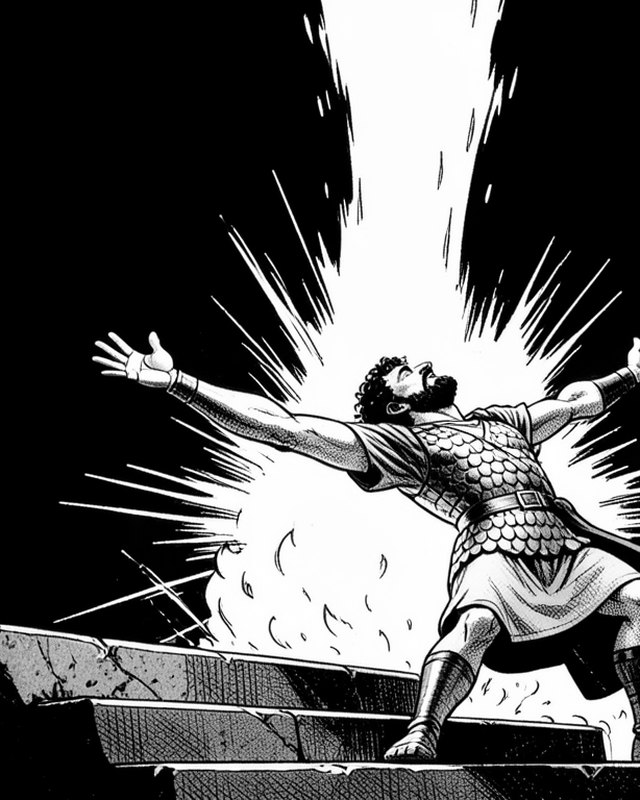
At the gates of Olympus a thunderbolt and a voice tell Aeneas to go back. Athena tells him it is over; Ares beats him to the marble; Zeus, his own grandfather, declares the gods will be clean of Troy, and when Aeneas calls him a coward he strikes him dead without turning around. On the grey shore of the dead Hades is kind to him, shows him Creusa on the far bank and asks what he would give for a new chance with her. Aeneas signs in lead without reading, Poseidon rises behind him, and at dawn two figures walk into the camp.

Guides

How to write a book, step by step

A practical guide to writing a book from the first idea to a finished manuscript: premise, length, structure, a story bible, drafting, revision passes and getting to the end.

AI book writing software, judged honestly

How AI actually helps an author — co-writing, editing, continuity and feedback — what it should never do, and how to judge an AI writing tool before you trust a manuscript to it.

How to publish a book yourself

From finished manuscript to a book on sale: editing, formatting, EPUB / PDF / DOCX, covers, metadata and the platforms — a practical self-publishing checklist.

Questions authors ask

Does the AI write my book for me?

No — and that is deliberate. The AI drafts and suggests, but nothing enters your manuscript until you press Apply on a consent card. Asked to imitate a voice it has never seen, the ghostwriter refuses and asks for a sample of your own prose first. You are the author; the book stays yours.

Who owns the book I write here?

You do. Your manuscript, your characters, your world and anything generated for you belong to you. You can export the whole thing to DOCX, PDF or EPUB at any time and walk away with it.

Is there a free plan?

Yes. You can start writing without a card, with a daily free allowance of AI chat messages and free export to Markdown and plain text. Paid plans add the heavier AI modes, illustrations and DOCX / PDF / EPUB export.

What exactly is one AI credit?

One credit covers about 1,000 tokens — roughly 4,000 characters, or two pages of text. It counts both what you send and what the AI writes back, every request is rounded up, and nothing ever costs less than one credit. So a short question costs 1, while asking for a long scene costs more. Illustrations draw on a separate pool: one picture is one image credit. Both allowances refill each month with your plan.

Can I use it offline, as a desktop app?

Yes — there are Windows and Linux desktop builds that run the studio locally. An internet connection is needed for the AI features and to keep your account in sync.

Will it work for my genre?

The studio is genre-agnostic: novels, non-fiction, memoir, fantasy, sci-fi, romance, thrillers and children's books all use the same chapter-and-scene structure, character tools and export pipeline.

Do I have to be an experienced writer?

No. A first-launch tour shows you around, and the ghostwriter opens with a nine-step wizard — idea, reader, hero, structure, narration, world, method, rhythm, voice — that builds the foundation of the book by asking questions.

Which languages does the interface support?

English, Russian and Turkish, switchable at any time. You can also keep several language editions of the same novel inside one project.

Can I bring a manuscript I have already started?

Yes. The import wizard reads a Word document, detects chapters, can split long chapters into scenes, and will optionally extract characters, world notes and relationships from the text.

Your story is already there. Start turning it into a book.

Free to start, no card required.